Difference between Export & Export All in Data Loader
Difference between Export & Export All in data loader is really interesting.

There are two buttons available in the data loader ‘Export’ & ‘Export All’. The difference in both button functionality is very small. When we use the ‘Export’ button for any object in Salesforce, all records( excluding records present in Recycle Bin) present in the system for that particular object are exported to a .csv file. But when we use Export All, all records (including records present in Recycle Bin) for that particular object are exported to a .csv file. Deleted records present in the recycle bin are also called ‘soft Deleted’ records.
When you choose fields to be extracted using a data loader, you can select the IsDeleted field as well because it tells which record is soft-deleted and which is not.

(IsDeleted = true) –> record has been soft deleted.
(IsDeleted = false) –> record has not been deleted.
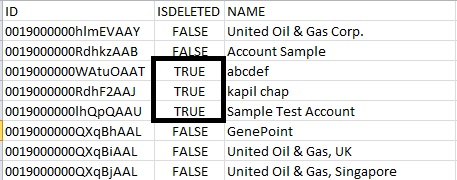
I clicked on Export All and in the screenshot below, you can see there are some records for which IsDeleted is true. These are some records that were present in the recycle bin(soft deleted).
For more reference on data loader, Go to Data Loader Reference

Comments
Post a Comment